


Webwhiteboard is a new website that provides users with interactive whiteboard software that runs in a web browser. It will run on any brand of interactive whiteboard, all you need is a web connection. There’s nothing to install, and your whiteboard files live in the cloud so you can access them anywhere.
Having your files in the cloud also means you can easily access them on tablet devices such as iPads without having to install an app or juggle files via Dropbox.

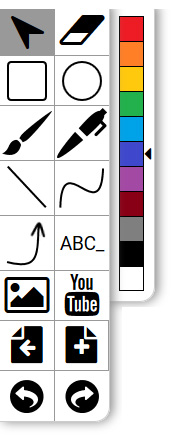
The Whiteboard tools provided are as you would expect for any whiteboard software. There are shapes, text and line tools. The line tools will let you draw polygons and closed shapes. There are some thickness tools, which are accessible via an advanced properties toolbar. Objects can be grouped together, cloned and there’s also an infinite cloner tool.
The insert image tool allows you to upload files from your computer as well as provides an internet search feature to get images from other websites. The YouTube button allows for easy embedding of YouTube videos by copy/pasting the video URL.
The makers of Webwhiteboard tell me that they are still developing features, so do expect the tools available to change as the site develops and matures. For example I’d like to see more colours, an easier way to change thicknesses of pens and lines, and an eraser that just erases pen rather than clears the whole screen.
Like other whiteboard software you can choose different backgrounds for your pages, with several graph papers and lined papers available. Default page background colours can also be set.

Webwhiteboard will import PowerPoint files as well as Smart Notebook files so if you already have resources in those formats you can easily get them into Webwhiteboard. It will also import the common whiteboard format (.iwb) files. Like many import tools the files will need a bit of work after importing to make them look exactly how you want them – regrouping graphics etc.
Files are stored in the cloud, and can be cloned, tagged and shared with colleagues. It is also possible to get a link to share with students so they can access the resource for themselves. The admin area will allow for pupils and staff to be added as users, with CSV uploads for bulk uploads. Your whiteboard files can also be exported as .IWB files if you want to have a more permanent backup, or you want to use regular whiteboard software again in the future.
After my first play with Webwhiteboard I have to say I quite like it. It’s not as fully featured as something like Smart Notebook and ActivInspire, but then they come with other issues. There’s no messing with licence keys, large installs and buttons that only work if you pay extra. Sometimes focusing on the basic tools allows for less distractions.
If you are in a school with mixed brands of whiteboard then moving to an independent platform does make sense and prevents the problem of needing to use different sofware and resources depending on the classroom you are in.
Web whiteboard is a subscription service. The pricing structure depends on how many students your school has, from £250 a year for a small school with less than 200 pupils to £1400 a year for a 1000+ pupil school. You can try webwhiteboard free for 30 days to see if you like it.
To find out more, go here: www.webwhiteboard.co.uk


