


Here’s a great way to create a quiz to accompany a YouTube video, using ChatGPT to speed up the question-creation process.
You could play the video in class then run the quiz, or you could set this as a homework activity within Kahoot for the students to access at home.
Find a video you want to use. Open the video transcript and copy/paste it into ChatGPT. Ask ChatGPT to generate multiple-choice questions based on the transcript. Copy/Paste these questions and answers back into Kahoot.
Obviously, spend a bit of time proof-reading the questions. Make sure they are relevant and the answers are correct.
As well as Kahoot, this would work with many other quiz-making tools such as Socrative and more.
This video explains how to do it:
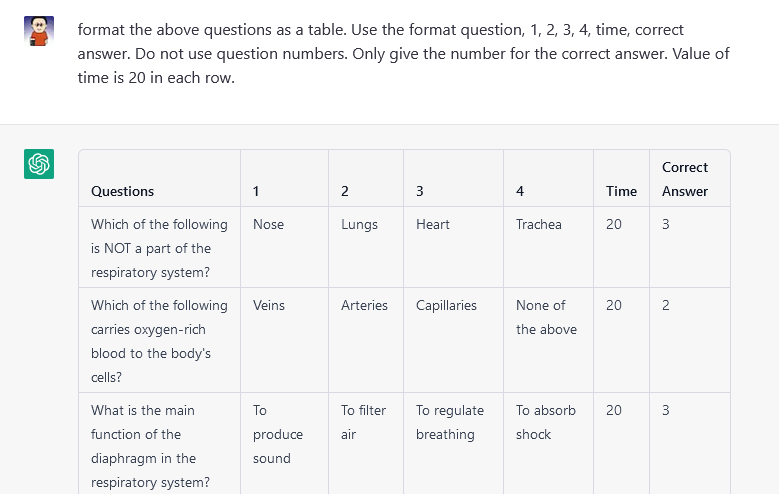
Update – I’ve been tinkering with the ChatGPT Prompts, and I’ve found a way to get it to format the answers as a table which you can then just copy/paste into a spreadsheet. Use this prompt: “format the above questions as a table. Use the format question, 1, 2, 3, 4, time, correct answer. Do not use question numbers. Only give the number for the correct answer. Value of time is 20 in each row.”
Download the template from Kahoot here, and open it in Excel.
Copy and paste the table from ChatGPT into this spreadsheet.

Save the file and follow the instructions on this page to import it.
Add the images to each question and save the quiz.
If you’ve got some better ways of doing this, let me know in the comments below!





Amazing blogs keep up the good work 🙂 if you get time do also checkout https://dpsiedge.edu.in/index.php