

This was going to be a blog post to support a talk I was going to give at the World Education Summit in Beirut, Lebanon this weekend. Sadly, due to escalating political unrest in the country, the conference has had to be postponed to a later date. In the meantime, here’s what I was going to cover.
The world is advancing at a rapid pace. And while I don’t fully subscribe to the idea that we need to be preparing children for 21st century jobs which don’t exist yet, the truth is that the future brings in many challenges that will need to be faced. This talk by Graham Brown-Martin is worth a look, and he explains that the big threat to a lot of jobs is going to be automation. The jobs of the future will be the ones that can’t be automated and replaced by computers or robots. These jobs will require creativity, passion, imagination and social and emotional intelligence.
The 4C’s of Learning
With this in mind, the 4C’s as discussed here are as follows : Collaboration, Creativity, Communication and Critical Thinking. In general these cover:
- Collaboration: working together to achieve a common goal.
- Creativity: thinking outside the box. Seeking novel solutions.
- Communication: how to best convey/present their ideas. Discussion/planning with others. Sharing with experts.
- Critical thinking: solving problems. Reaching conclusions from available facts. Assessing evidence. Fact checking.

There are different ways that technology can support the 4C’s. Devices such as tablets provide ease of access to many different multimedia creative tools. Many of the apps that can be used provide cross-platform support so students are not tied into a single device. They also provide easy access to the cloud which allows collaboration between multiple students both inside and outside of school.
Collaboration
The ability to collaborate on documents is becoming increasingly commonplace. The big players are the likes of Google Docs and Office 365 which allow very easy collaboration across multiple devices. Students can collaborate and add to/edit documents such as presentations, text files and spreadsheets in real time. Collaboration tools have also been built into other cloud tools such as Dropbox.
Microsoft One Note features Class Notebooks. These act as a personal workspace for every student along with a collaboration space for lessons and creative activities. If students are using devices that use pens such as Microsoft Surface or certain Ipad models, then they can even hand write annotations using digital ink for a more natural feel. This allows for sketched plans, diagrams and suchlike. Good for collaborative planning. You can find more information about One Note Class Notebooks here.
Padlet is a tool I’ve written about many times before. It’s an online space for collating and collecting ideas. It’s great for planning a project as it allows anyone with the link to view and edit the content on the page. They can add videos, text, images and web links. Makes a great mood board for collating ideas and information ahead of starting on a group project, and it can also be used for sharing and collating information as they go along. You get three padlets for free, with additional boards costing extra.
Wakelet is another planning/collaboration/curation tool which allows a group to create a digital portfolio in a similar way to Padlet, but it’s free. There’s a nice guide to using Wakelet in the Classroom here.
Flipgrid is a video response platform where educators can have online video discussions with students or other educators. Teachers can provide feedback to students AND better yet students can provide feedback to one another. The Ed Tech Team have a great writeup here. Here’s a good guide to Flipgrid from Ed Tech Roundup too.
Creativity
There are many great ways that tablets and other devices can be used as creativity platforms in the classroom. They provide easy access to creativity tools using built-in cameras and microphones. An iPad can be used to create any and all of the following:
- Videos
- Animations
- Screen casts
- Drawings
- Infographics
- Comic Strips and Graphic Novels
- Ebooks
- Music
- Podcasts
Digital Storytelling Apps
There are a great many apps that can be used for Digital Storytelling, creating content in many different ways. These include Puppet Pals, Sock Puppets, Toontastic, Prezi, Morfo, Comic Life and more. This blog post highlights some of my favourites.

Video, Animation and Green Screening
Tablets, including the iPad can be great tools for recording and manipulating video. Apps such as Stop Motion, Touchcast and DoInk can be used for green screening, filming and stop motion animation. iMovie can be used for editing it all together. Students could write and film their own-professional looking news reports, life stories, revision guides and more.
Virtual, Augmented and Mixed Reality
Virtual and Augmented reality allow the blending of the digital resources with the real world experiences. Google Cardboard allows for simple Virtual Reality using a phone whilst Oculus (and others) and Class VR use more expensive all in one headsets. Tools such as Google Expeditions allows you to take classes on virtual field trips to places they’d never be able to go on a school trip. They could go a rainforest, a desert or even the International Space Station.
Combine this with Google Tour Creator and they can create their own guides to different areas, maybe even incorporating panoramic video they’ve taken themselves with a 360 degree camera.
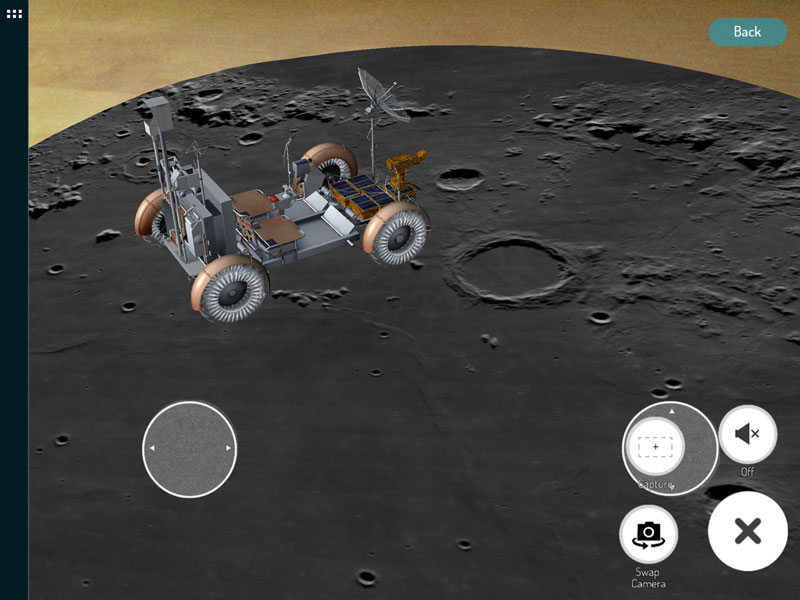
Augmented Reality allows for virtual objects to be placed alongside real objects. Some even allow for the objects to be manipulated, so students could drive a tank, a space rover or fire a roman catapult. This can become a stimulus for creative writing, problem solving and more.
Maker Spaces
Many schools are creating opportunities for students to become “makers” and build and create devices that incorporate electronics, lights, sensors and more. These can be simple cardboard creations, use Lego blocks or even be stitched into clothing. This lovely blogpost describes one school’s makerspace journey.
A Makey Makey is a simple device for detecting 6 different inputs and using them to control a simple program written in Scratch, for example to create music. There are lots of different ways to incorporate a maker mentality into schools, with things like Hummingbird Robotic Kits, SAM Labs, Lego WeDo, Sphero, LittleBits, Arduino , Raspberry Pi and BBC MicroBits all proving easily accessible kits.

Getting involved in Coding projects can also develop creativity as well computational thinking. Scratch is obviously one of the main platforms that teachers think of, but there’s also Tynker, Code.Org, Hopscotch and Tickle as well as game design platforms such as Kodu. Coding can obviously be used to make games and control some of the devices listed above, but it can also be used to create apps, animations, solve maths problems and take sensor readings.
Minecraft is a well-known and well-used platform for creative projects. It allows for large-scale designing and building projects, and with a shared server many students can collaborate on the same joint build such as recreating the school or a town. Some ideas for using Minecraft can be found here.
Communication
There’s a big overlap with creativity here. Many apps allow students to present their ideas in creative ways also build on their communication skills. They can share what they know, explain what they have done using a range of digital tools. Students can engage in discussion and debates using a walled social media tool such as Edmodo. Flipgrid would again be useful here as well as simple forum software.
An app such as Book Creator for iPad allows the students to publish their work as an ebook to be downloaded and read by family and friends.
Apps such as Canva or the Adobe Spark suite allow the creation of images and infographics to explain concepts and ideas that they have studied.
Podcasting (using apps like Audacity) and Screencasting (using Explain Everything) allows another digital platform to demonstrate and share their knowledge and understanding of a particular topic.
Blogging is still a platform thas has relevance in schools. Blogging about the things they are studying allows students to:
- write about their passions;
- practice civil discourse by giving and receiving feedback;
- experiment with different forms of communication;
- connect with the world in meaningful ways.
Projects such as QuadBlogging aims to connect schools around the world into blogging support groups – each sharing blogposts and commenting on each others posts. It’s free, check it out!
Critical Thinking
Critical thinking can involve skills such as judging the accuracy of information they read on the internet. Or it can be the discussion and analysis of an issue to form a judgement. Activities such as checking the reliablity of internet sites can be used as a starter. Also Breakout / Escape Room type activities such as Breakout Edu can provide for logical and lateral thinking.

We should be careful when trying to teach critical thinking as an activity in itself. Daniel Willingham has written some interesting papers on why it’s so hard to teach effectively and also how to teach it. He suggests:
- Thinking critically shouldn’t be taught on its own. Best when taught alongside subject knowledge
- Can use the students’ own experiences as way to introduce trickier concepts.
- To teach critical thinking strategies, make them explicit and practice them.
- It’s not just for your advanced students. All can benefit.
Leadership Skills
By carrying out creative projects in groups, students can develop other skills such as planning and resilience. Developing any kind of project will involve skills such as:
- Planning
- Storyboarding
- Delegation
- Cooperation
- Collaboration
- Time Management
Another site worth looking at is Apps for Good. This provides free online courses for students to develop apps, internet of things devices and machine learning tools. It is very good for building skills, teamwork, planning and problem solving.

The 4 P’s of Practice
When thinking about how to incorporate the 4C’s into your teaching, consider what Mitchel Resnick (Lifelong Kindergarten) describes as the Four P’s of Practice. Projects, Peers, Passion and Play. These are:
- Projects. People learn best when they are actively working on meaningful projects –generating new ideas, designing prototypes, refining iteratively.
- Peers. Learning flourishes as a social activity, with people sharing ideas, collaborating on projects, and building on one another’s work.
- Passion. When people work on projects they care about, they work longer and harder, persist in the face of challenges, and learn more in the process.
- Play. Learning involves playful experimentation –trying new things, tinkering with materials, testing boundaries, taking risks, iterating again and again.
These are useful skills for your students, but also for teachers to consider too!
If you’ve got great ways that you’ve incorporated the 4C’s into your teaching. Put them in the comments below!



I have been using creativity as it teaches pupils to think in a way that’s unique to them. The power of collaboration should not be overestimated. It teaches students that groups can create something bigger and better than you can on your own. Communication teaches students how to efficiently convey ideas using various channels, reading, writing, speaking and listening. Combined, the four C’s empower students to become one-person think tanks. AWESOME.
I think that one of the most intriguing aspects of using digital technology within the classroom for children is how much you can do with it and the creativity you can use. This is great for class projects and ensuring that children are working collaboratively and helping eachother to use these tools as effectively as possible.
The blog shared is very much informative & clearly explains the importance of educational technology for children. I think the growth of technology has really made learning of new skills a lot easier for kids. Teaching skills like coding for kids has become fun & interactive due to various apps & games. TechyKids Canada provide various coding for kids courses & programs which prepare students for a better future. Thanks for sharing such a great article with us.